If you are planning to run B2B or wholesale alongside DTC, Shopify B2B now works on every paid plan — including Basic at $39/month. You no longer need Shopify Plus or expensive apps. The native B2B features Shopify opened to all plans on April 2, 2026, are more than enough to run your wholesale business smoothly, no matter which paid plan you are on.
This guide walks through the whole thing in order: what a Shopify B2B store actually is, the features every wholesale business needs, what Shopify gives you natively, which theme to pick, where apps stop being optional, and how to find your first buyers once the store is live.
What is a Shopify B2B store?
A Shopify B2B store sells to other businesses — retailers, distributors, dealers, contractors — rather than to the end user of that product. On Shopify, use a different mode of the store you already have, where buyers sign in to a company account and see prices and terms that were set for them.
The difference matters because almost every assumption behind a DTC store breaks in wholesale. Here is what actually changes:
| Difference | Retail (DTC) | Wholesale (B2B) |
|---|---|---|
| Who buys | The person using the product | A buyer purchasing for their business |
| Price | One public price for everyone | Negotiated, and different per customer |
| Order size | One or two units | Cases, pallets, minimum quantities |
| Payment | Card, at checkout | Net 30 or 60 — you are extending credit |
| Who can see prices | Anybody | Approved accounts only, usually |
| How they shop | Browse, discover, get persuaded | Search a SKU, reorder, leave |
| Buying cycle | Minutes | Weeks or months, then repeat forever |
Core features every Shopify B2B store needs
To operate smoothly, a modern b2b or wholesale store requires specific functionality that standard retail stores do not:
- Company accounts. A buyer is not a person, it is a business with several people working behind it, each with different permission.
- Custom pricing. Tiered pricing, volume discounts, and customer-specific negotiated rates.
-
Order minimums and pack sizes. If you sell in packs of 12, buyers have to
order in multiples of 12 — and the store has to say so at the cart, not in a follow-up
email. Shopify calls this an increment rule, and it rejects anything in between:
- Allowed:12 units — Allowed
- Allowed:24 units — Allowed
- Allowed:36 units — Allowed
- Not allowed:5 units — Not allowed
- Not allowed:18 units — Not allowed
- Flexible payment terms. Support for Net 30/60/90 terms, purchase orders (POs), and vaulted credit cards for future billing.
- Fast ordering. Tools for bulk CSV uploads or SKU-based quick order forms for fast replenishment.
- Minimum order quantities (MOQs). Restrictions on case packs or cart minimums.
- Request for quote: It's better to have an option to request a quote and negotiate the price.
Native Shopify B2B capabilities (2026 updates)
Shopify's native B2B module is available on Basic, Grow, Advanced, and Plus as of April 2, 2026. A merchant on the cheapest paid plan can now do all of this without upgrading:
-
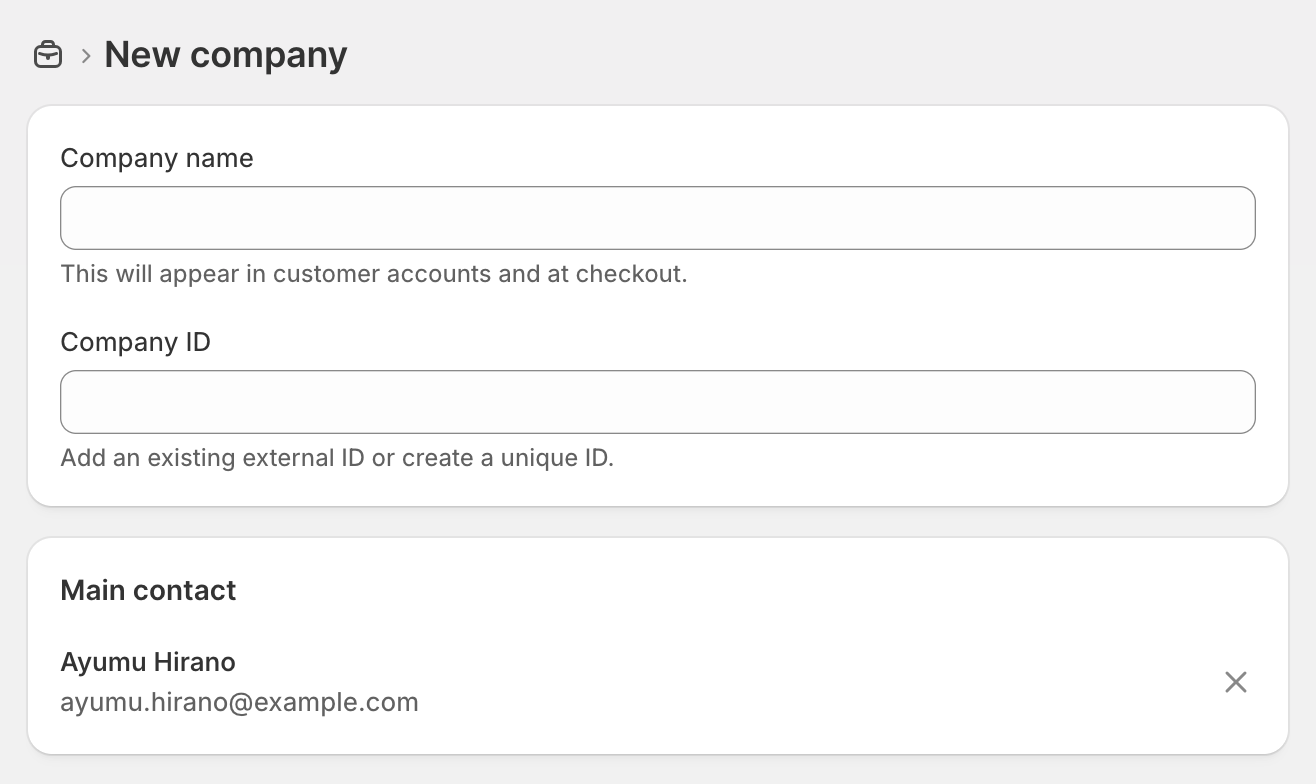
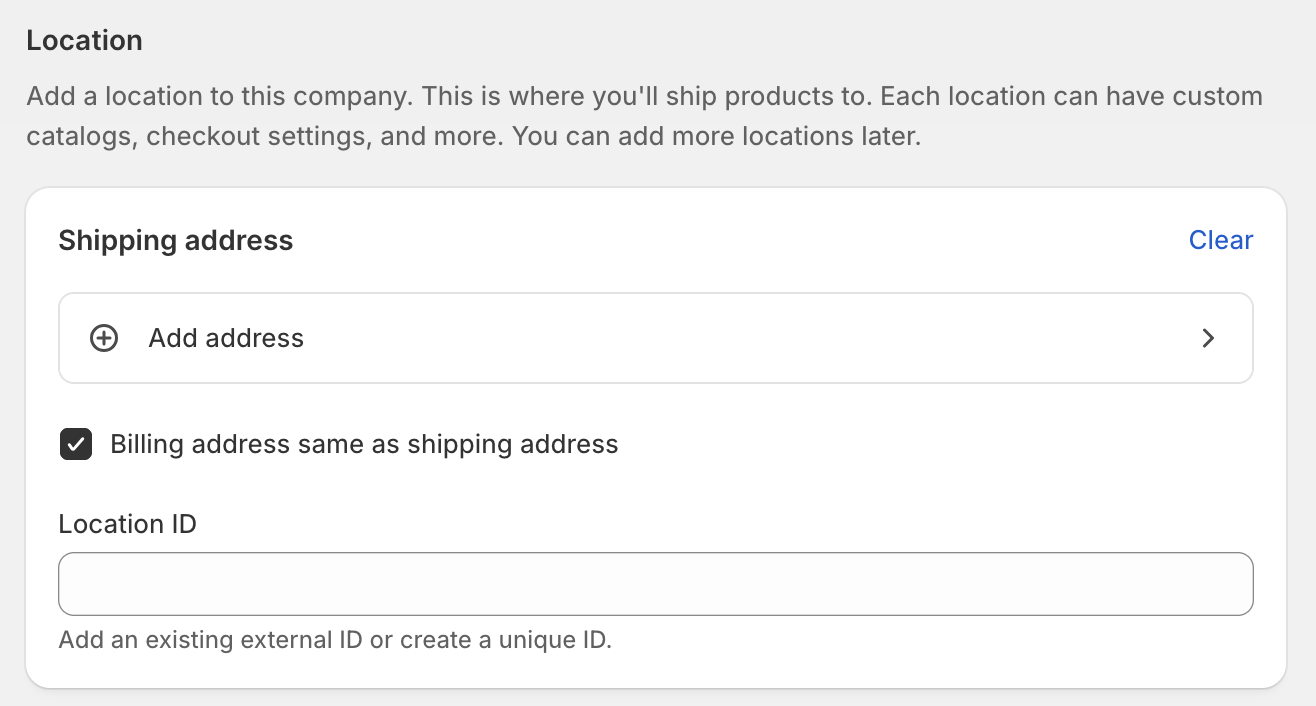
Company profiles: Group multiple buyers, locations, and permissions under a single company entity.
> Markets > Customers > Companies
-
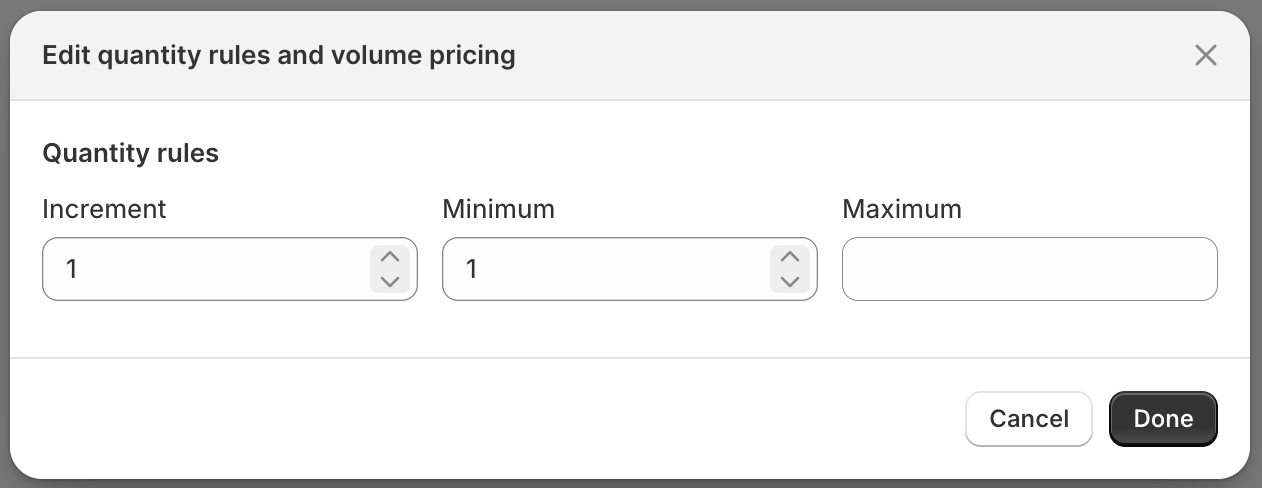
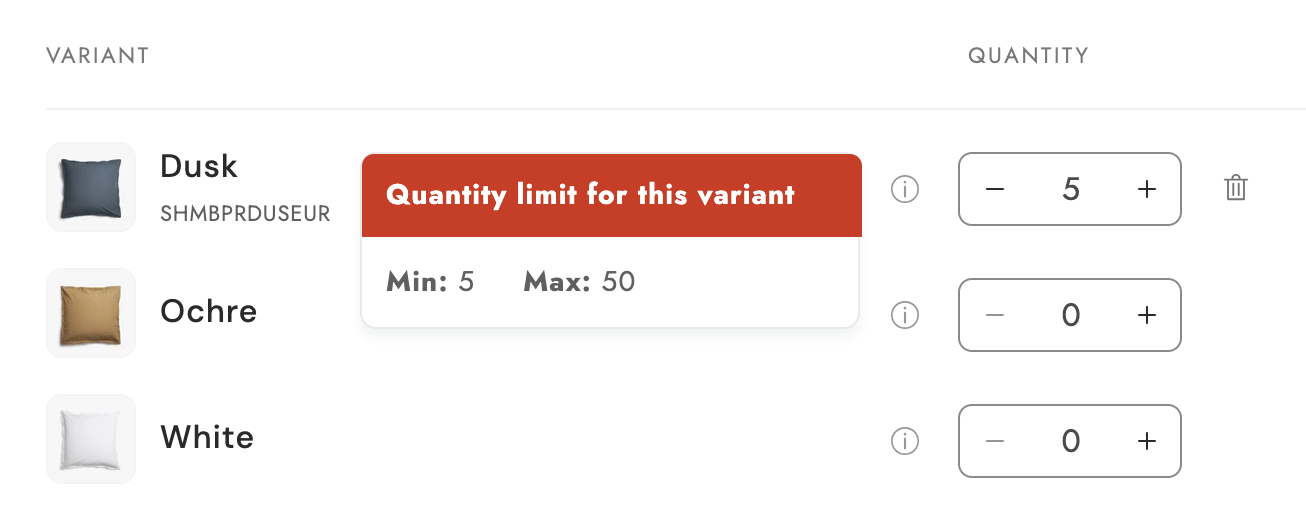
Quantity rules: Create customer-specific conditional rules for products and variants, including minimums and maximums, case packs, and increments.
> Markets > Catalogs > + Add rules
-
Volume pricing: Easily implement quantity price breaks to get your B2B customers buying in larger quantities.
> Markets > Catalogs > + Add rules
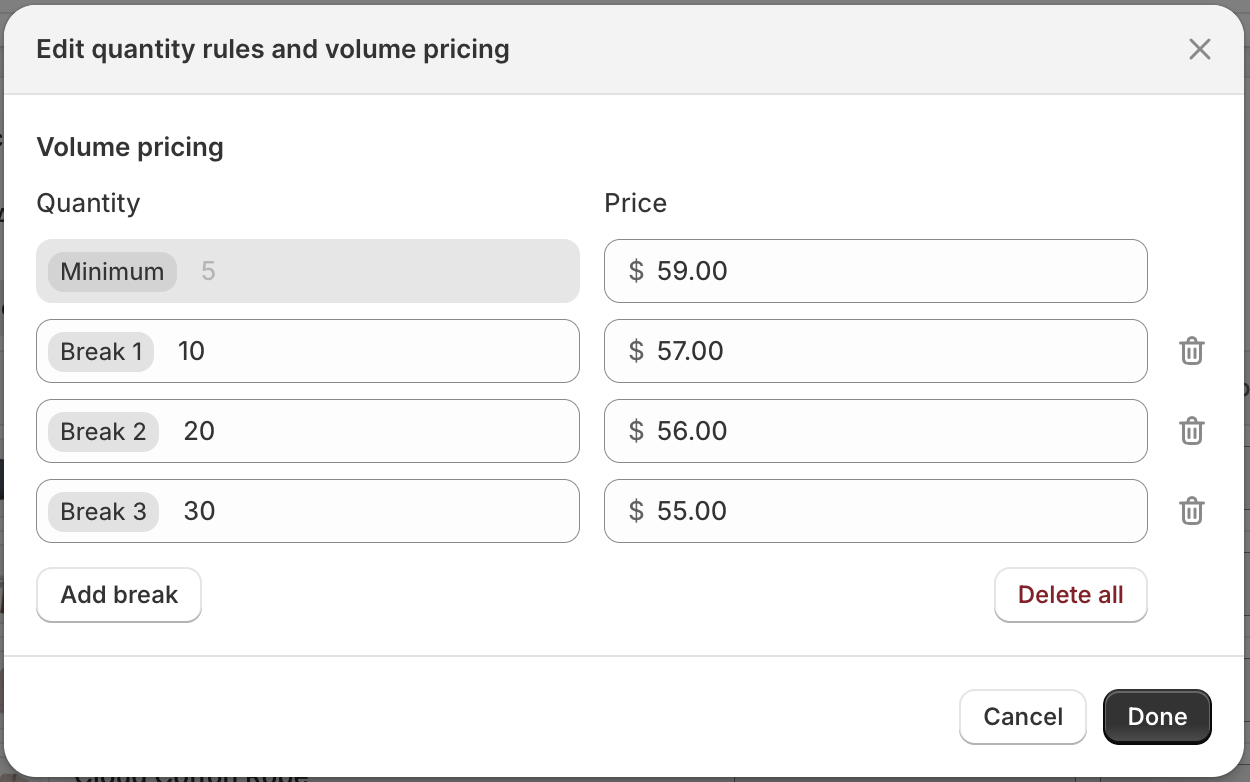
Volume pricing shown to the buyer on the storefront 5+ $59.00 USD/ea 10+ $57.00 USD/ea 20+ $56.00 USD/ea 30+ $55.00 USD/ea Min 5 -
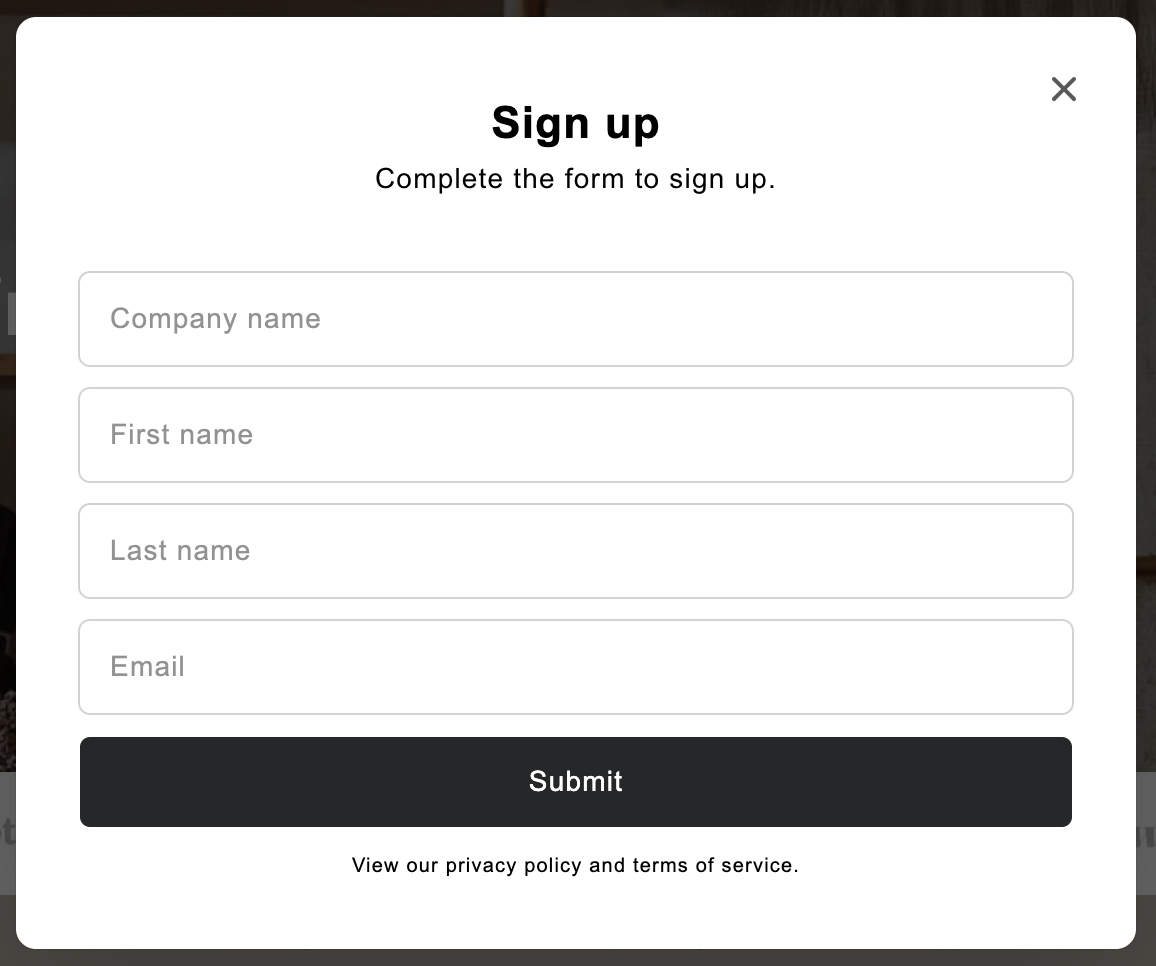
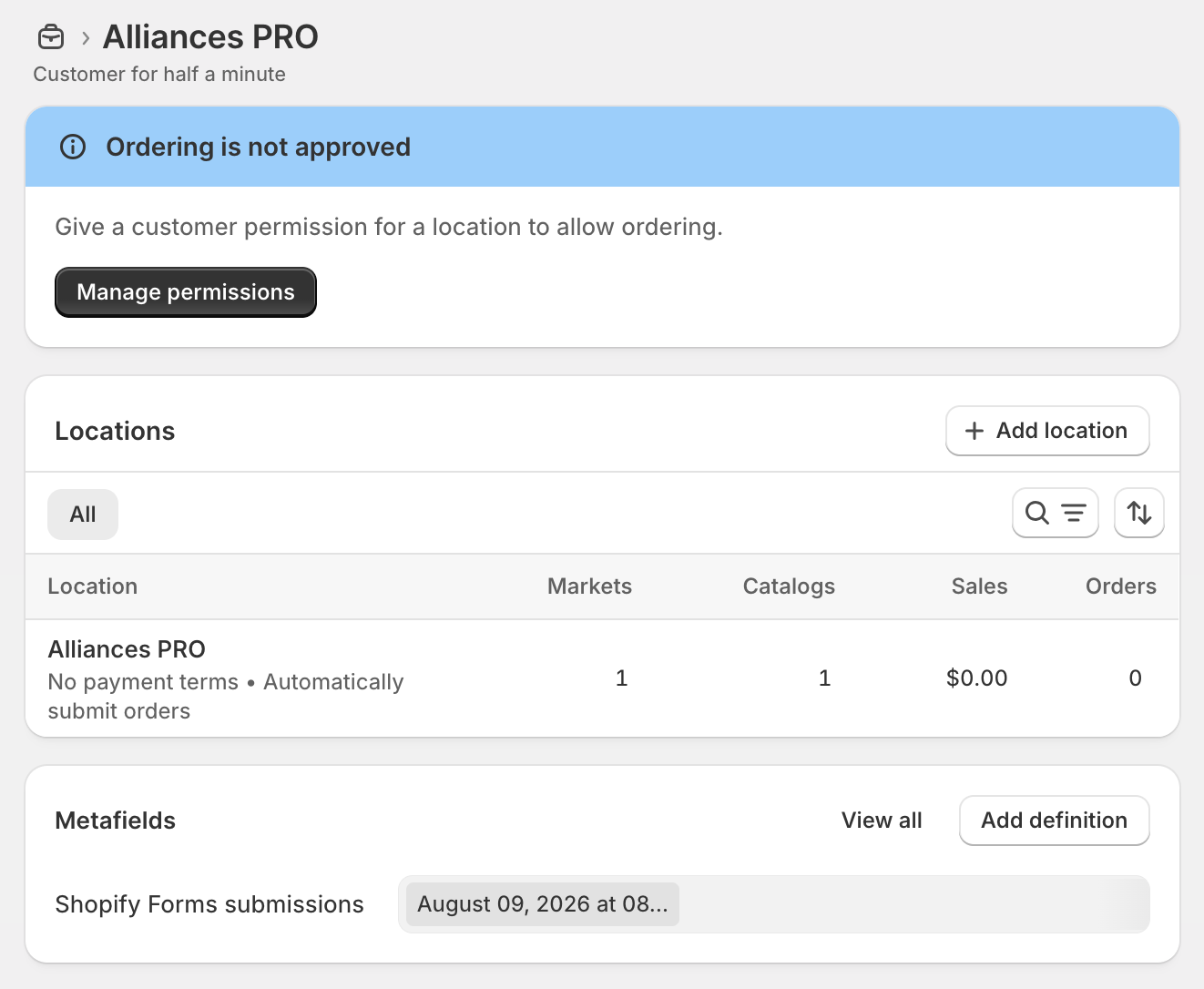
Company account requests: Add an account request form to your store with Shopify Forms. Buyer details save as a company account automatically, so they can buy wholesale as soon as you approve.
 Shopify Forms
Store Admin
Customers
Companies
Select company
Approve
Shopify Forms
Store Admin
Customers
Companies
Select company
Approve
-
Quick bulk ordering: Show buyers a list of all products and variants so they can order sizes, colours and more from the product page or a separate order form.
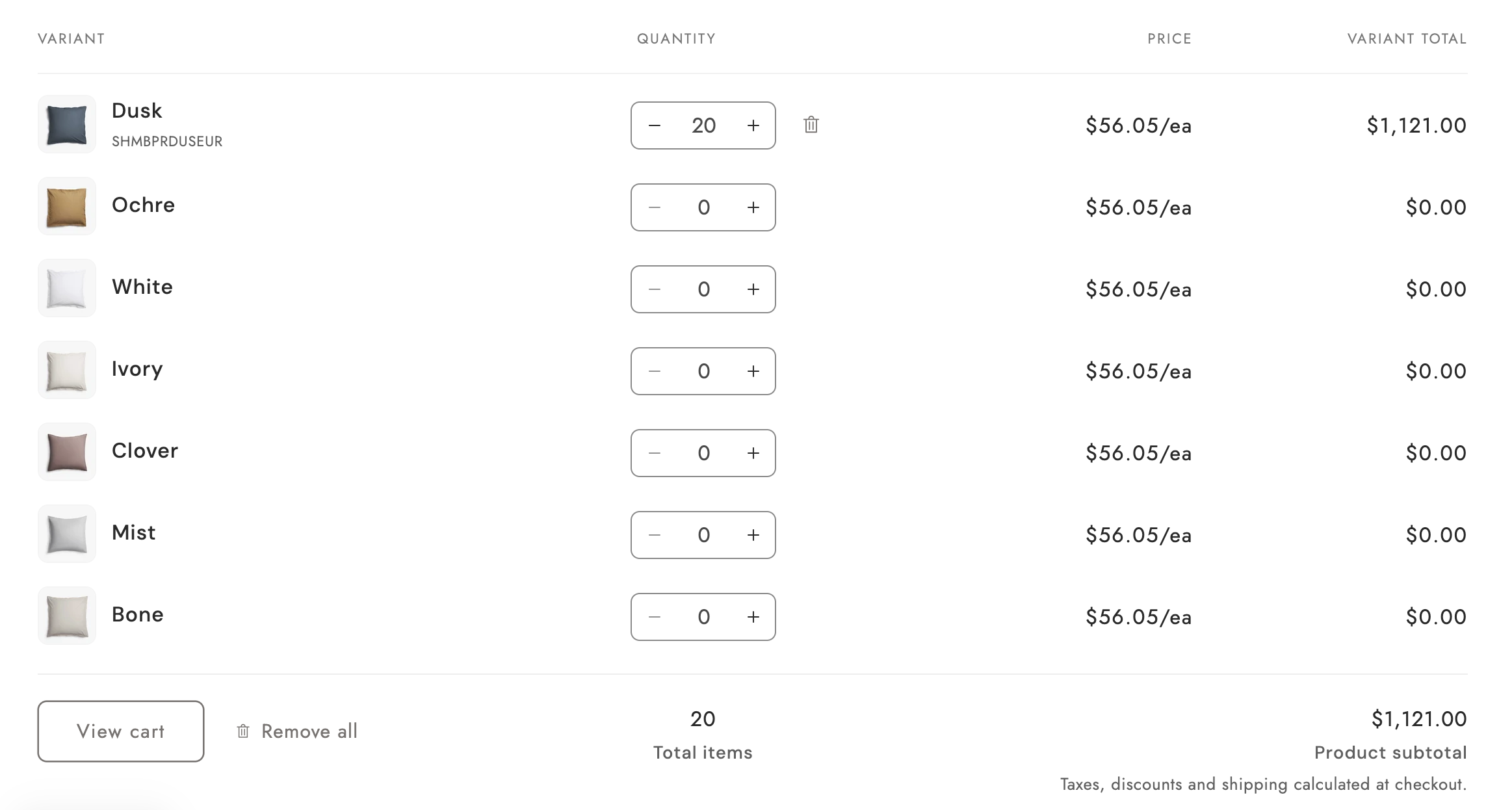
Shopify B2B pricing: when do you need Shopify Plus?
Check out the feature comparison table below. It gives you a clear and simple breakdown of exactly which B2B features are available across the different Shopify plans, so you can easily choose the best fit for your growing business.
| Feature | Basic | Grow | Advanced | Plus |
|---|---|---|---|---|
| Companies and customers | ||||
| Companies | Included | Included | Included | Included |
| Company locations | Included | Included | Included | Included |
| Location-level permissions(location admin and ordering only) | Included | Included | Included | Included |
| Catalogs and products | ||||
| Number of B2B catalogs(assignable to B2B markets) | 3 | 3 | 3 | Unlimited |
| Direct company catalogs(assigned to a company or location) | Not included | Not included | Not included | Included |
| Quantity rules(minimum, maximum, and increment) | Included | Included | Included | Included |
| Quantity price breaks | Included | Included | Included | Included |
| Payments | ||||
| Net terms | Included | Included | Included | Included |
| Payment reminders | Included | Included | Included | Included |
| Automated Clearing House(United States only) | Included | Included | Included | Included |
| Vaulted credit cards | Included | Included | Included | Included |
| Deposit requirements(companies) | Not included | Not included | Not included | Included |
| Deposit requirements(draft orders) | Not included | Not included | Not included | Included |
| Partial payments | Not included | Not included | Not included | Included |
| Payment requests per fulfillment | Not included | Not included | Not included | Included |
| Checkout and orders | ||||
| Draft order to invoice | Included | Included | Included | Included |
| Checkout to draft | Included | Included | Included | Included |
| Easy reorders | Included | Included | Included | Included |
| PO numbers | Included | Included | Included | Included |
| Contextual checkout(using Shopify Markets) | Not included | Not included | Included | Included |
| Sales staff | ||||
| Sales staff permissions | Included | Included | Included | Included |
| Storefront | ||||
| Trade theme | Included | Included | Included | Included |
| Quick order list | Included | Included | Included | Included |
| Contextual storefront(using Shopify Markets) | Not included | Not included | Included | Included |
| Complementary B2B features | ||||
| Shopify Flow(using B2B objects) | Included | Included | Included | Included |
Source: Shopify Help Center — B2B features by plan
In short: If Shopify's standard B2B features and apps can handle your requirements, you may not need Plus. Shopify Plus becomes useful when you need more catalogs, deeper customization, or advanced B2B workflows.
Choosing a Shopify B2B theme
The three themes worth considering, in order of fit:
Trade
Shopify's free B2B theme
Only Shopify B2B and wholesale business
Pros
Default features activated for Shopify B2B and wholesale.
Cons
Purely B2B. If you also sell to regular customers, the store may look too simple.
Warehouse
$320 USD, built for large catalogs
Large catalogs and experienced B2B buyers.
Pros
Many variants, deep filtering and B2B buyers who already know how to set up.
Cons
B2B behaviour is not built in: gated pricing and quick ordering come from native B2B and apps.
Empire
$360 USD, one storefront for retail and wholesale
Retail and wholesale from the same store.
Pros
Customizable for wholesale and subscription brands.
Cons
Built for DTC first, so every wholesale feature is one you have to add rather than inherit.
When you need Shopify B2B apps
Before installing anything, turn on the free tools — a surprising number of merchants pay for apps that duplicate them.
| Free tool | What it covers |
|---|---|
| Customer accounts | The foundation. Nothing in B2B works without it. |
| Shopify Forms | Wholesale application form with an approval gate |
| Shopify Flow | Order tagging, payment reminders, new-company alerts |
| Hide price & Quick order | By default Trade theme provides those features. |
While native Shopify B2B features cover the fundamentals, complex operations will eventually require paid third-party apps. You will need apps when your workflow demands:
- Custom quoting workflows or back-and-forth price negotiations.
- Deep synchronization with legacy ERPs or CRM tools.
- Sales rep portals where internal teams place orders on behalf of clients.
- Highly specific quantity rules.
Shopify B2B apps that are nice to have
You do not need these apps on day one. Only install them when your business grows and you need to save time.
- Credit limits: Automatically stop a buyer from ordering if they owe you too much money (for example, over $5,000).
- Taking deposits: Native Shopify only lets Plus users take partial payments. For other plans, use an app like Downpay.
- Tax & VAT check: Shopify handles basic tax rules, but you need an app to automatically check and validate a buyer's VAT number.
- Hiding content: If you want to hide specific pages or products so only approved buyers can see them, use an app like Locksmith.
- SKU search: B2B buyers usually search by exact SKU numbers instead of browsing. If you have more than 500 products, get a dedicated search app.
- Better reporting: Shopify's basic reports are very simple. You will eventually need an app to track exactly which dealer buys which products.
How to market a B2B store on Shopify
Shopify B2B marketing is about building trust, providing education, and nurturing long-term relationships.
- Account-Based Marketing (ABM): Identify your top ideal corporate clients and tailor highly specific outreach campaigns directly to their decision-makers.
- Content & SEO: Create technical whitepapers, case studies, and detailed documentation. B2B buyers conduct extensive research before reaching out.
- Automated Reorder Campaigns: Use Shopify Flow and email marketing to remind buyers when it’s time to restock based on their historical purchasing cadence.
- LinkedIn Networking: Leverage LinkedIn to connect with procurement managers and share industry insights.
Your first 30 days: a checklist
If you do nothing else in this guide, do these in this order. The sequence matters more than the speed — step one blocks everything after it.
-
Week 1 — foundations
- Switch to new customer accounts under Settings → Customer accounts. B2B does not work without it, and this is the single most common reason a setup appears broken.
- Confirm your store is on new Shopify Markets — B2B catalogs attach to B2B markets, so this is a hard prerequisite on Basic, Grow and Advanced.
- Create one test company with your own email as the buyer.
-
Week 2 — pricing and rules
- Build your first catalog and attach it to a B2B market. Remember the limit of three.
- Add quantity rules — minimums, increments, case packs — to the products that need them.
- Set payment terms. Net 30 is the default expectation; decide now who gets it.
-
Week 3 — storefront
- Install the Trade theme, or configure gated pricing on the theme you have.
- Publish the wholesale application form with Shopify Forms and link it from the navigation.
- Place a full test order as your test buyer, from login to invoice, and watch what breaks.
-
Week 4 — first buyers
- Invite five to ten buyers you already know. Not fifty — you want to fix problems quietly.
- Watch where they stall. That is your real list of which apps to buy, and it will not match the list you assumed.
- Only now install the first paid app, against a problem you can name.
Summary
Setting up a Shopify B2B store in 2026 is more streamlined than ever. By leveraging native company profiles and catalogs, choosing a utility-focused theme, and strategically using apps like DQ Request a Quote to handle negotiations, you can build a highly efficient enterprise portal. Focus on making the buyer's journey as frictionless as possible, and back it up with targeted, relationship-driven marketing.